AI video analytics for the cameras you already have
Your cameras record. ProDataAI Lens tells you what they saw: live alerts when something needs attention, and every detected event searchable in plain language.
Most sites have dozens of cameras and nobody watching them. Footage is opened after something has gone wrong, and then someone spends hours scrubbing through recordings. ProDataAI Lens watches every camera around the clock, alerts the person responsible the moment something needs attention, and answers questions like “did a white van enter gate 2 after 10 pm?” in seconds instead of an afternoon.
Built for European rules: no facial recognition, no biometric identification, and your data stays in an EU cloud, your own cloud or on your premises.

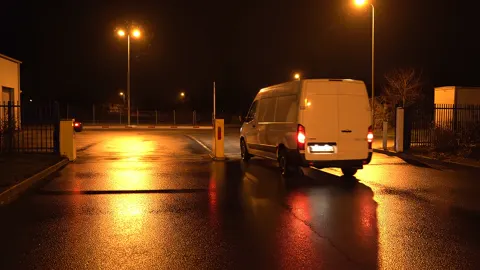 van
22:14:080:12
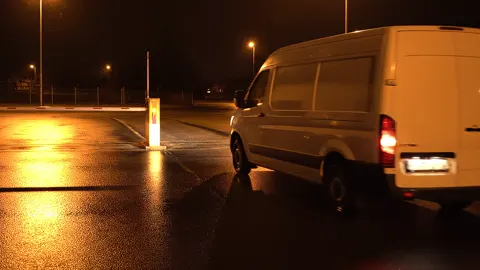 van
22:16:410:09
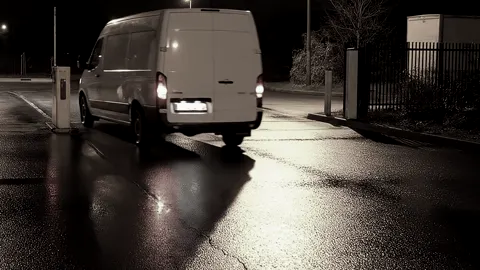 van
22:21:030:15
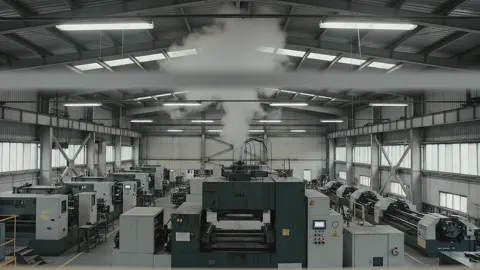 Clip attached
What ProDataAI Lens does with your cameras
A short film on what ProDataAI Lens does with the cameras you already have: live alerts with the clip attached, and answers to questions in plain language.
Read the transcript
Your site has forty cameras. They record everything, and nobody is watching.
When something happens, someone spends an afternoon scrubbing through footage to find a few seconds.
ProDataAI Lens watches every camera, around the clock. Smoke in a hall, a gate open at night, someone in a danger zone: the person responsible gets an alert with the clip, straight away.
And you can simply ask, in plain language. ProDataAI Lens finds the matching moments across every camera.
Built for European rules: no facial recognition, footage in the EU or on your premises, and ready for your works council.
Your cameras record. ProDataAI Lens tells you what they saw. Book a free 30-minute call at prodata.ai.
Questions we hear from security, operations and facility managers
These are the questions we hear most often, and what changes with ProDataAI Lens.
“We have forty cameras and nobody watching them.”
No control room can watch forty screens, and attention fades within minutes.
Every camera is watched around the clock. People only look when there is something to see.
“Finding the clip takes an afternoon.”
After an incident, someone scrubs through hours of recordings to find a few seconds.
Describe what you are looking for in plain words and get the matching clips from every camera.
“We cannot find enough guards, and our alarms cry wolf.”
Security staff are hard to hire, and motion detectors fire on rain, shadows and cats, so the people you have chase false alarms.
Your team only acts on confirmed events, with the clip attached, so the same people can cover more cameras and sites.
“Nights and weekends are our blind spot.”
Empty sites, open gates and late deliveries go unnoticed until Monday.
Intrusion after hours, vehicles at the gate and open zones trigger an alert with evidence, at any hour.
“We see safety incidents too late.”
Smoke, blocked escape routes or people in hazardous zones show up in the footage, afterwards.
Fire, smoke and entry into danger zones raise an alert while there is still time to act.
“Data protection stops every camera project.”
The works council, the data protection officer and IT security all have to agree, and rightly so.
No facial recognition, documented purposes and retention, and the paperwork your works council and data protection officer need.
First cameras live in two to four weeks
No new cameras: ProDataAI Lens works with the standard IP cameras and network video recorders (NVR) already installed on your site. Depending on your systems, the first cameras usually go live within two to four weeks. A full rollout across your sites typically takes up to a quarter, and new use cases that need a model trained for your site take longer.
- 1
Connect your cameras
A small agent on a computer at your site reads your existing IP cameras and recorders. No new cameras, no open ports: video leaves over one encrypted connection, or stays on site.
- 2
ProDataAI Lens watches every camera
Fire and smoke, missing helmets, vests and safety shoes, intrusion into areas you draw on the camera image, people and vehicles counted in and out, occupancy limits and number plates at gates. You choose the use cases per camera, and the zones and hours each camera is watched.
- 3
The right person gets the alert
Each alert has a severity, from low to critical. Critical alerts such as fire go out at once; lower ones are bundled, so nobody is flooded. Every alert comes with a snapshot and a short clip from just before to just after the event, by email, text message or your team's messenger, to the people responsible for that zone and severity. If you want, someone on your own staff confirms each alert first.
- 4
Ask, watch and review
Search everything ProDataAI Lens has detected in plain language and get the matching clips in seconds. Watch any camera live with detections marked. A daily report arrives at the time you choose, and you can create a report whenever you need one.
Typical use cases by industry
ProDataAI Lens is configured for each site. Common starting points:
Manufacturing
Fire and smoke, helmets, high-visibility vests and safety shoes, entry into hazardous zones, too many people in a restricted room
Warehousing and logistics
Vehicles counted in and out at the gate with times, number plates at entry and exit (agreed with your data protection officer), loading bay activity, intrusion after hours
Retail
Movement after closing, stock rooms and cash offices, deliveries left unattended
Campuses and public buildings
Crowding at entrances, occupancy limits for rooms, restricted labs and plant rooms, incident search across a large camera estate
Construction sites and yards
Perimeter breaches and theft at night, vehicle movements, unattended machinery
Energy, utilities and critical sites
Perimeter and restricted-area intrusion, with a fully on-premise option and no outside connection
Not on the list? Because ProDataAI Lens understands plain language, you can search for things that are not on this list. New alert types for your site may need a model trained on your footage; we plan that with you, including the time it takes.
Built for European rules
Video analytics in Europe has to satisfy your data protection officer, your works council, your IT and the EU AI Act. We set up every deployment so it does, and document it.
No facial recognition
ProDataAI Lens finds events, objects and situations, never who someone is. It does not recognise faces or identify people.
Clear of the EU AI Act's red lines
No biometric identification and no emotion recognition: ProDataAI Lens stays clear of the practices the EU AI Act prohibits and of its high-risk category for biometrics. We document this for your compliance file.
GDPR from the start
ProDataAI Lens stores only incident data, the event with a snapshot and a short clip, for as long as you decide. Your full recordings stay on your own recorder. Access by role, every access logged. We help you prepare the data protection impact assessment, the signage and the data processing agreement under Art. 28 GDPR.
Ready for your works council
No monitoring of employee performance: no tracking of individuals, no productivity scores. Search can be switched off, and report data is kept only as long as you decide. We document the configuration so it can be agreed with your works council before go-live (in Germany under § 87 BetrVG).
Prepared for your IT review
One outbound, encrypted connection from a small agent on site: no open ports, no VPN, no firewall changes, and nothing changes on your cameras or recorder. ProDataAI Lens reads the lower-resolution substream your recorder already provides, which keeps the load on recorder and network low. We go through your IT requirements with your team before go-live.
Your data stays with you
ProDataAI Lens runs in an EU cloud environment, in your own cloud or on your premises, so your data stays with you. Your own staff can administer it: cameras, zones, use cases and who gets which alert. Our support handles maintenance and software updates.
For your data protection officer, works council and IT
Our data protection and security pack: the data processing agreement (on your template or ours), a template data protection impact assessment, our technical and organisational measures and a template for your works council agreement.
More on how we handle data: Trust & Data
Four ways to run ProDataAI Lens
| Option | How it runs | Best for |
|---|---|---|
| Cloud (EU) | The on-site agent streams securely to a private, isolated cloud environment in the EU, where the AI runs. Every sub-processor involved is named to you in advance. | Fastest start, lowest upfront cost, several sites in one view |
| Your own cloud | ProDataAI Lens runs in your company's own cloud account, under your security policies. | Companies with their own cloud platform and IT operations |
| Hybrid | A GPU server on site handles detection locally; search and reports run in the cloud. | Many cameras or limited bandwidth |
| On-premise | The full platform runs on your own hardware, with no outside connection. | Critical infrastructure, public sector and high-security sites |
Made for sites with cameras and too little time to watch them
A quick check of whether ProDataAI Lens suits your site.
A good fit if
- You run one or more sites with IP cameras or a network video recorder
- Incidents come to light after the fact, by searching footage by hand
- You want fewer false alarms and no extra screens to watch
- Data protection and works council approval matter to you, and you want both settled before go-live
Probably not (yet) if
- You have no recording system at all yet: start with the cameras, then come back to us
- You want to identify people by their face: ProDataAI Lens deliberately does not do that
- You want to measure how hard employees work: we do not build that
Not sure? That is what the free first call is for.
What we need from you
A list of your cameras and recorders, a computer on site for the agent (or a server for hybrid and on-premise setups), an outbound internet connection for cloud setups, and the people who should receive alerts. We involve your data protection officer and works council from the start.
Three steps, from demo to rollout
You never commit to more than the next step. Each one ends with a clear result and a decision that is yours.
-
1 one session
Live demo
What happensWe show you ProDataAI Lens on a system that is already running: live alerts, the dashboard, reports, and the search, where you ask your own questions. The unplanned questions are the point.
What you get- ProDataAI Lens working live, with your questions
- A first view of which use cases fit your site
- A data protection checklist for your data protection officer and works council
Your decisionIs a pilot worth it?
-
2 one site or zone
Pilot
What happensUnder a pilot agreement we connect your cameras on one site or zone, with success measures agreed up front: which events, how fast, how many false alarms.
What you get- ProDataAI Lens working on your own cameras
- Zones, rules and alerts set up and tuned
- Data protection impact assessment and works council documentation
- A pilot report against the agreed measures
Your decisionDid it meet the measures? Then roll out.
-
3 24/7
Rollout and run
What happensWe connect every camera and site, tuned from what the pilot taught us, and keep ProDataAI Lens running: monitoring, updates, rule changes and support.
What you get- Every camera and site connected
- Daily and weekly reports
- Ongoing support, updates and rule changes
Your decisionAdjust zones and rules any time, and add sites as you grow.
Your people stay in charge. Alerts go only to the people you name, per zone and time. The optional second check is done by your own staff. Your own staff can be the administrators; our support handles maintenance and updates. We sign a data processing agreement under Art. 28 GDPR; details on our page Trust & Data.
Computer vision we have already run in production
- Our team has put computer vision into production on a steel finishing line, in a leasing return bay, at a customs point and in a police investigation.
- We set up and support ProDataAI Lens for European sites: data protection, integration, configuration and support, with one contact at ProDataAI.
- One senior team from the demo to the live system, support from Germany, and one contract with ProDataAI under German law.
- We tell you when cameras are the wrong answer: sometimes better lighting, a fence or a changed process does more than AI.
Our computer vision work

Kamlesh Kshirsagar Founder
Your contact from the first call to the live system. 20+ years in data and AI, hands-on in every project.
Use cases, industries and guides
Detailed pages on what ProDataAI Lens does at different kinds of sites, and guides to the rules for video surveillance in Germany, Austria, Switzerland and the UK.
Use cases
- Site and perimeter protectionIntrusion into areas you draw, after hours, with the clip attached.
- Construction site monitoringTheft and intrusion at night, vehicles, unattended machinery.
- Safety gear (PPE) detectionMissing helmets, vests and safety shoes, entry into danger zones.
- Fire and smoke early warningFire and smoke on camera, confirmed across frames, as an extra early warning.
- Gate, yard and number platesVehicles counted in and out with times, number plates at entry and exit.
- Retail: after closing timeMovement after closing, stock rooms and cash offices, unattended deliveries.
- Occupancy and crowdingPeople counted in and out, occupancy limits per room, crowding at entrances.
- Searching recorded eventsAsk a question in plain language and get the matching clips from every camera.
- Danger zones and forklift lanesPeople in zones around machines, cranes and forklift lanes, as an alert with the clip.
- Unattended objects and blocked exitsObjects left too long in areas that must stay clear: escape routes, fire doors, entrances.
- Loading bays and yardWhich bays are occupied, how long trucks wait and stand, and what happened at a bay.
- Loitering and tailgatingSomeone lingering in a restricted area, a second person following through a secured door.
Industries
- ManufacturingSafety gear, danger zones, fire and smoke, restricted areas, the gate.
- Logistics and warehousingGate and yard, loading bays, safety gear, fire in storage, the site at night.
- Campuses and public buildingsCrowding at entrances, occupancy limits, restricted labs and plant rooms.
- Energy, utilities and critical sitesPerimeter and restricted-area intrusion, fully on premises if needed.
- Quarries, gravel pits and miningRemote sites at night, people near heavy machinery, the weighbridge, diesel and copper theft.
- Farms and agricultureMachinery and diesel theft, intruders in barns at night, fire and smoke in hay and straw stores.
- Offices and corporate sitesSecured doors and server rooms, the building after hours, foyers, car parks and space use.
- Public transport and depotsDepots at night, crowding on platforms and at stops, unattended bags, fire in charging areas.
Guides and rules
- GDPR, works council and the EU AI ActThe legal frame for AI video analytics in Germany and the EU, in one guide.
- Signage checklistWhat belongs on a CCTV sign under the GDPR, with an example layout.
- Checklist: DPIA and works agreementWhat to cover in the DPIA and the works agreement for AI video analytics.
- Austria: video surveillance rulesDSG image processing rules, works council consent under the ArbVG.
- Switzerland: video surveillance rulesThe revised FADP, the ban on behaviour monitoring at work, the EU AI Act's reach.
- UK: CCTV and the ICOUK GDPR, the ICO's video surveillance guidance, facial recognition, employees.
- AI video analytics vs. motion detectionWhy motion alarms cry wolf, and what object detection changes.
- AI video analytics and guard servicesNot either-or: how cameras with AI and people on site work together.
- Fire early warning vs. certified video fire detectionAn extra early warning on existing cameras, or a certified fire detector.
- Cloud, hybrid or on premisesWhere the video is analysed, and what each setup means for IT and data protection.
- GlossaryVideo analytics terms explained: NVR, VMS, ONVIF, RTSP, ANPR, DPIA and more.
Frequently asked questions
Do we need new cameras?
Does it replace our video management system or recorder?
How accurate is it?
Does it work at night and in bad weather?
What happens if the internet connection drops?
Is this allowed under GDPR?
What about our works council?
Does ProDataAI Lens recognise faces?
Where is our footage stored?
Who can access our system, and from where?
Can we use the clips as evidence for police or insurers?
Can ProDataAI Lens connect to our alarm receiving centre or video management system?
What happens if we stop?
How do you keep false alarms down?
Can ProDataAI Lens replace our fire alarm system?
Is ProDataAI Lens available in German?
What does it cost?
See ProDataAI Lens in action
Start with a free 30-minute call. Tell us about your site and your cameras. Then see ProDataAI Lens live on a running system and ask it the hardest question you have about your site.
- Free first call
- No new cameras
- No facial recognition
- Your data stays with you
or email ai@prodata.ai